

Meet Auto-Start Student Groups: A Faster, Smoother Start to Every Class
Jump to Section
Want to see more?
Bring the power of GoGuardian to your school or district today.

Summary
- Start every class instantly with preconfigured student groups and settings
- Eliminate repetitive setup and reduce early-class disruptions
- Support differentiated instruction without added teacher workload
- Keep students focused from the first minute with a ready-to-go classroom
From the moment students walk into a classroom, the clock starts ticking. When it comes to learning, every second a teacher can get to reach learners matters. It takes time to set the tone and establish focus, all while trying to kick things off in the most productive way possible. And while an educator may be prepared with a lesson plan, it doesn’t mean their overall setup will be ready to go each period.
Manually configuring student groups, adjusting filters, and fixing settings that didn’t carry over is repetitive, time-consuming, and disruptive. That’s why we’ve created a solution that gets you set up for success in seconds with GoGuardian Teacher’s Auto-Start Student Groups.
The problem with manual setups
Many teachers rely heavily on small-group instruction, which means for every class period, they must:
- Recreate the same group configurations
- Apply filters and settings from scratch
- Troubleshoot issues mid-instruction
The result?
- Lost instructional time
- Inconsistent learning environments
- Off-task behavior during transitions
- Interruptions that break teaching momentum
In a time-sensitive classroom, even a few minutes of friction can ripple across the entire lesson.
Start class off right
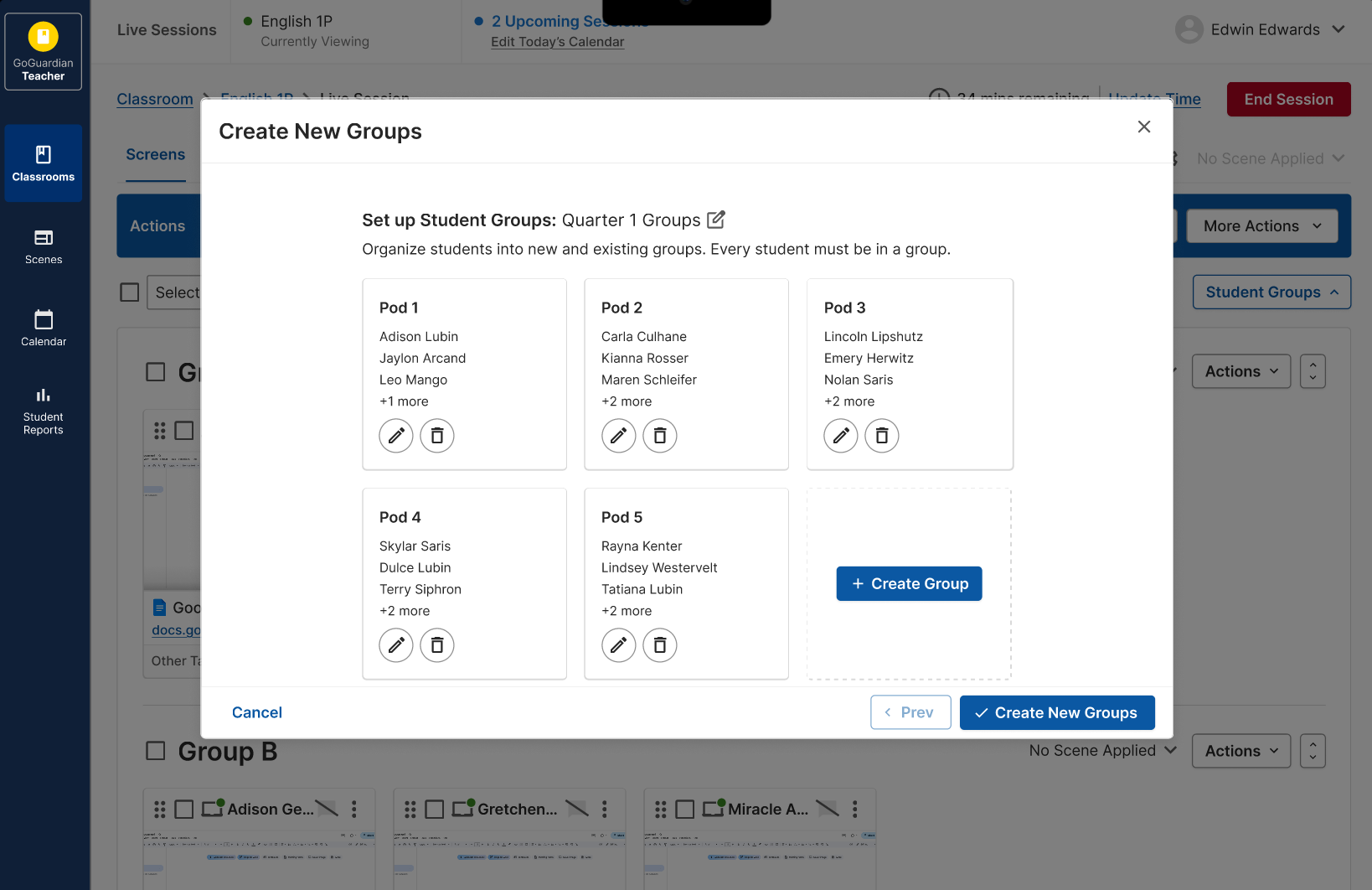
Auto-Start Student Groups removes these unnecessary steps so your classroom is learning ready from the second the bell rings. With Auto-Start Student Groups, preconfigured student groups and their settings are automatically applied the moment a session begins so you can focus solely on teaching.
Here’s how it works:
- Assign a default student group to your class
- Predefine group-level settings (like filters, scenes, or layout)
- Start your class and everything is applied automatically
What this means for teachers
Auto-Start Student Groups was designed to give teachers the precious instructional time they need back. With this feature, they can now:
Start faster: Your classroom is ready from the first second, no setup required.
Stay focused on teaching: Spend less time managing devices and more time engaging students.
Support every learner: Create differentiated environments for different groups without adding extra work.
Reduce disruptions: Eliminate the gaps where students drift off-task while you configure settings.
Built for the reality of teaching today
Teachers use small-group instruction every day. But managing those groups shouldn’t add to their cognitive load.
Auto-Start Student Groups makes it easy to:
- Maintain consistent setups across sessions
- Quickly support different learning objectives
- Keep transitions smooth and predictable
Because everything is automated, it reduces the need for mid-class fixes and interruptions.
For instructional leaders and super users, Auto-Start Student Groups helps drive:
- More consistent classroom practices
- Better use of instructional time
- Reduced teacher frustration and IT support needs
It’s a simple change that creates a meaningful shift in how classrooms run.
Ready, set, teach
Auto-Start Student Groups transforms the start-of-class experience from battling countless moments of friction to imparting a calm flow of new knowledge to eager young learners. With a one time set up, you start your journey from frazzled to calm, cool, and collected. Simply configure your default groups, enable auto-start, and walk into a classroom that’s ready when you are.

GoGuardian Team
Related Posts

Back-to-School Best Practices: Setting your GoGuardian Teacher Account Up for Success
Make the most of GoGuardian Teacher for an engaging school year by using our back-to-school checklist.

Explore the Enhanced GoGuardian Teacher for a New School Year
GoGuardian Teacher offers enhanced functionality for the upcoming school year.
How to Use Chromebook Monitoring Software to Protect Students
Keep students safe online with Chromebook monitoring software.
Bring the power of GoGuardian to your school or district today.