

GoGuardian Admin Filters What Other Solutions Miss
Jump to Section
Want to see more?
Bring the power of GoGuardian to your school or district today.
Summary
- Gain visibility into blocked embedded content, including iFrames and YouTube videos, directly within Browsing Activity.
- Apply more flexible filtering with new policy-level controls for embedded content instead of global settings.
- Troubleshoot faster with enhanced “Why Blocked” insights that show exactly which content was blocked and why.
District IT teams are expected to keep students focused and safe online, but that can be difficult when web filtering only evaluates pages at the surface level. Limited visibility allows distractions to slip through, while embedded content may be blocked without admins having clear insight into why.
That’s why we’re introducing new updates in GoGuardian Admin designed to close those gaps with greater visibility, smarter automation, and more granular control.
With new Embedded Content Filtering enhancements, admins can now proactively detect and block hidden activity and instantly understand why embedded content was blocked without digging through developer tools or investigating devices manually.
Granular embedded content filtering
Embedded content has historically been difficult to troubleshoot because traditional filtering systems only evaluate the top-level webpage.
That means admins often can’t see:
- Blocked iFrames
- Embedded YouTube videos
- Nested content requests
- The exact reason embedded content was blocked
In many cases, blocked YouTube videos appear as “Viewed” in browsing activity, creating confusion and reducing confidence in filtering policies. But now, GoGuardian Admin provides visibility directly into embedded content activity.
Admins can now enable Filter Embedded Content at the individual policy level instead of relying on an all-or-nothing global setting.
This gives districts more flexibility to:
- Enforce filtering on embedded content where needed
- Avoid unintentionally breaking login flows or educational tools
- Apply filtering more strategically across different user groups
How it works
- Admin enables Filter Embedded Content.
- GoGuardian captures sub-page-level embedded activity.
- Browsing Activity displays embedded iFrames and YouTube content directly in reporting views.
- “Why Blocked” now reflects embedded filtering rules.
Uncover blocked YouTube Videos and iFrames
Browsing Activity now surfaces the embedded content that was previously invisible.
Admins can:
- See which embedded YouTube videos were blocked
- Identify blocked iFrames directly in browsing history
- View detailed “Why Blocked” explanations
- Understand which policy triggered enforcement
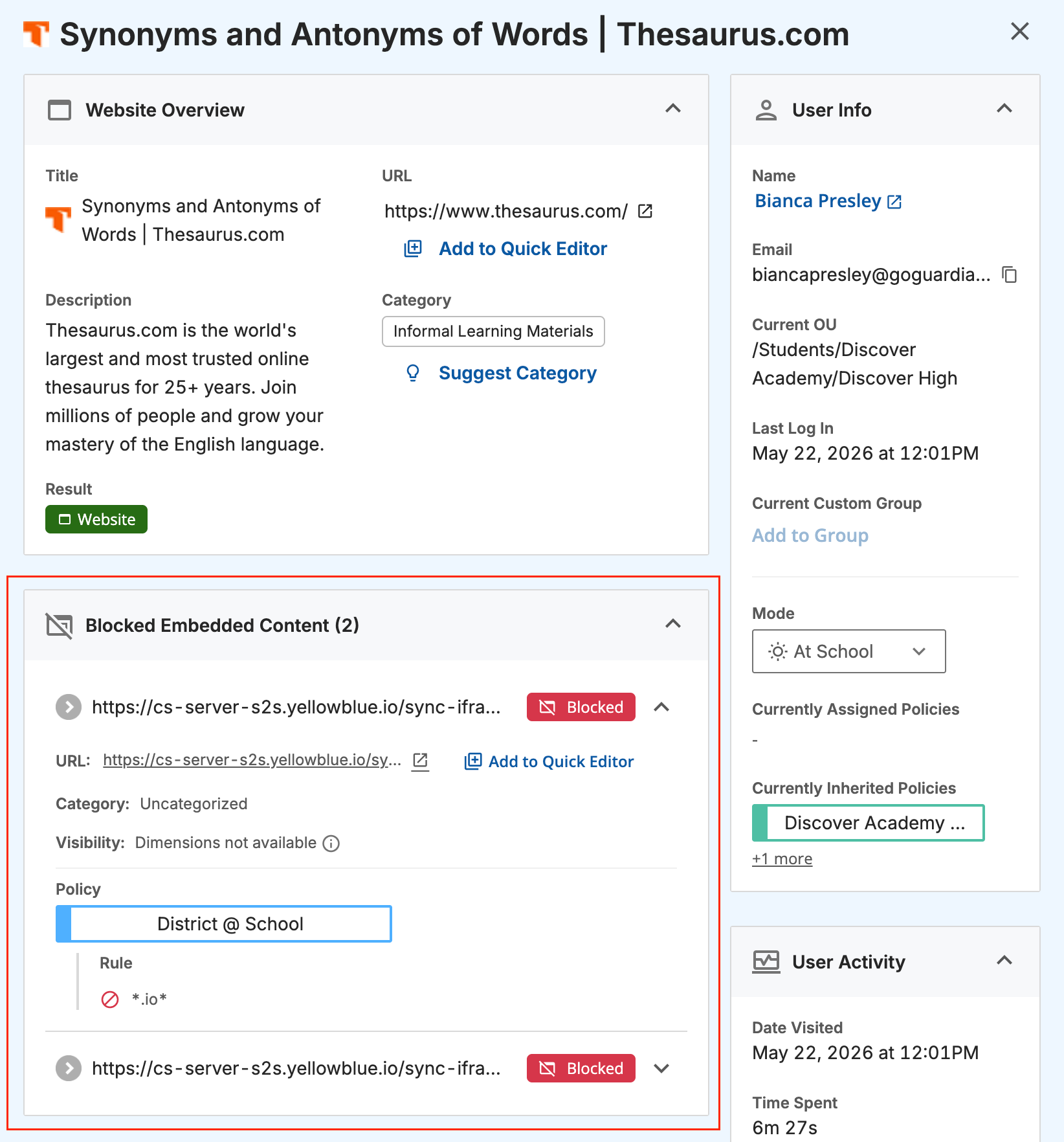
A new embedded content drawer view provides:
- URL
- Category
- Result (Viewed or Blocked)
- Policy information
- Embedded content details
This eliminates “blind” troubleshooting and helps IT teams resolve issues faster without physically accessing student devices.
New embedded content tags
Browsing Activity now includes a dedicated Embedded Content tag so admins can quickly distinguish nested content from top-level browsing activity.
With a single click, admins can:
- See whether blocked content was embedded
- Identify the policy responsible
- Understand filtering outcomes faster
This added visibility improves confidence in filtering behavior and simplifies investigations for support teams.
Why it matters
These updates were built for the reality that district IT teams face every day. Students are constantly discovering new gaming workarounds, which in turn increases the time admins spend on troubleshooting workflows.
With AI-powered detection and deeper filtering visibility, GoGuardian Admin now helps teams:
- Reduce support burden
- Improve filtering confidence
- Save hours of troubleshooting time
- Better protect instructional learning environments
Most importantly, admins gain the clarity to understand both what was blocked and why.

GoGuardian Team
Related Posts
Back-to-School Best Practices: Setting Your GoGuardian Admin Account Up for Success
Make the most of GoGuardian Admin for an engaging school year by using our back-to-school checklist.
Explore the Enhanced GoGuardian Admin for a New School Year
GoGuardian Admin offers enhanced functionality for the upcoming school year.
How to Use Chromebook Monitoring Software to Protect Students
Keep students safe online with Chromebook monitoring software.
Bring the power of GoGuardian to your school or district today.