

GoGuardian Admin Updates for Smarter, Simpler Web Filtering
Jump to Section
Want to see more?
Bring the power of GoGuardian to your school or district today.
With every new school year, web filtering needs continue to evolve. Today’s IT admins face a range of challenges, from clever student workarounds, such as YouTube downloaders, to gaps in website categorization and limited tools for managing critical alerts. That’s why we’re introducing a set of enhancements designed to make filtering in GoGuardian Admin smarter, faster, and more efficient for policy management at scale.
These updates directly address some of the most common challenges we hear from schools, giving you greater control, better insights, and fewer manual tasks.
Smarter YouTube filtering
Students love YouTube for tutorials and entertainment, but unmanaged access opens doors to distraction and policy bypass. With GoGuardian’s YouTube filtering, you can ensure that students only access YouTube videos approved by their teachers and block those pesky workarounds learners use to access inappropriate content at unsuitable times. Here are some features we’ve released to enhance our YouTube filtering capabilities.
- Automatically block YouTube downloader sites: Students using online tools to download videos and bypass YouTube policies? Not anymore. GoGuardian Admin now automatically detects and blocks YouTube Downloader sites, preventing students from accessing unapproved videos.
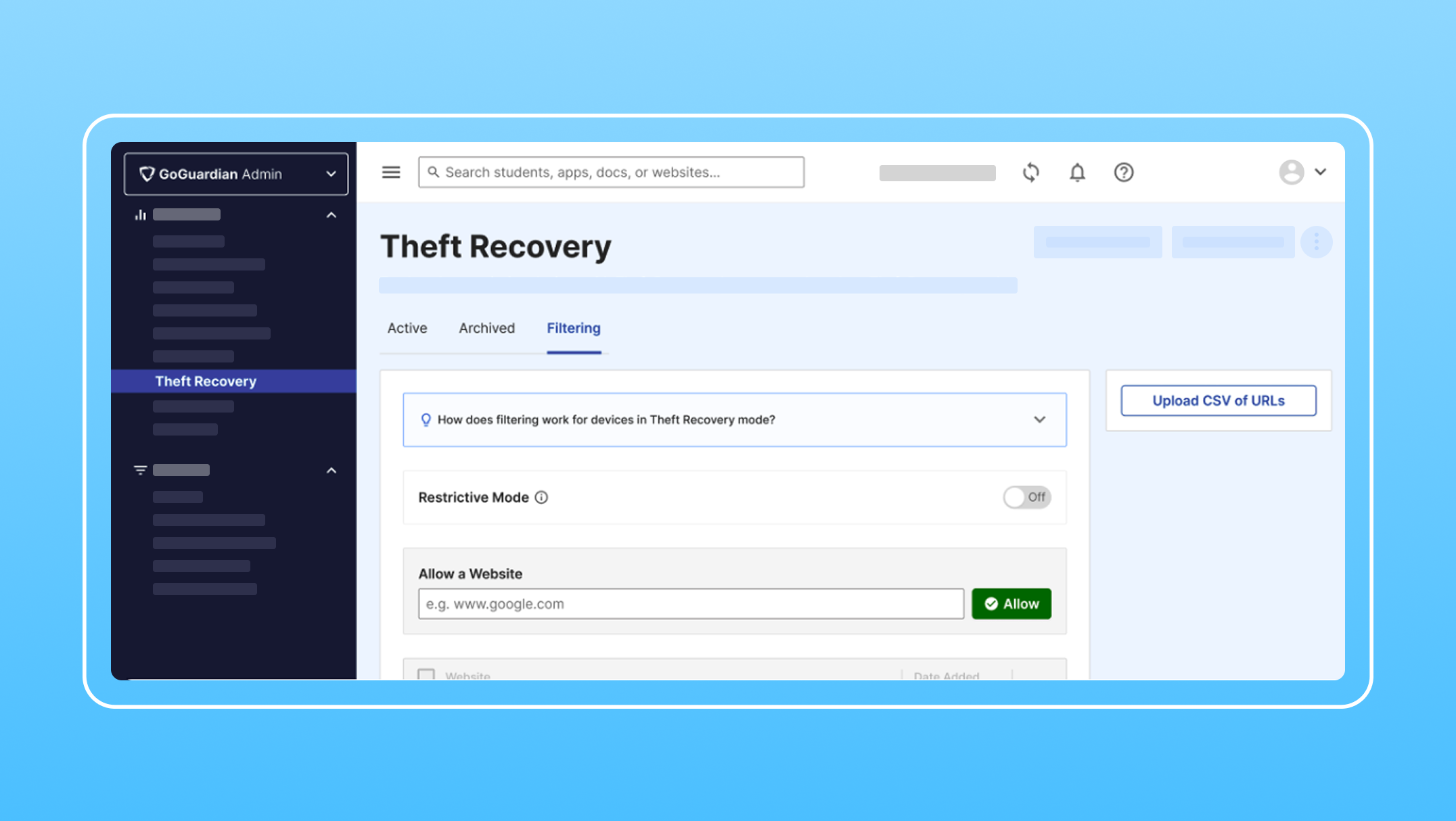
- Bulk-import YouTube URLs via CSV: Managing allow/block lists for YouTube just got easier. Admins can now import YouTube URLs directly into policies via CSV, saving time and simplifying bulk rule creation.
Smarter web categorization
The sheer number of sites out there can be tricky to navigate. We understand there’s nuance to pages students may need for extracurriculars or specialized classes. That’s why we’ve introduced new categories that eliminate common headaches and give you finer policy control.
- New categories for more granular filtering: We’ve added and refined categories to reduce the friction caused by “Uncategorized” blocks and to support digital learning better, including:
- Government: Covers school-appropriate .gov sites to improve policy precision.
- Coding: A new category to support STEM learning with greater clarity.
- Culture: Now a top-level category housing the existing Religion and Traveling subcategories, plus new Charities and Politics subcategories for added sensitivity controls.
- Government: Covers school-appropriate .gov sites to improve policy precision.
Smarter alerts and device handling
From ensuring student browsing safety to recovering lost devices, you need tools that support fast action and efficient collaboration. These updates make it easier to manage incidents, streamline workflows, and maintain visibility.
Share Smart Alerts via Email: Keep your team informed, faster. With new email-sharing for Smart Alerts, you can route alerts directly to users within your organization, based on role and OU permissions.
Export Smart Alerts as PDF: Need to escalate or document an alert? You can now export Smart Alerts as PDFs, enabling more structured workflows for school safety teams and administrators.
Filtering for Theft Recovery Mode: We’ve added filtering capabilities to Theft Recovery, allowing you to apply specific, customizable policies to lost or stolen devices. This helps ensure compliance, visibility, and security, even when devices are off-campus.
Make this year run smoother than ever before
These updates were designed with your workflow in mind, providing:
- Faster, more intuitive filtering
- Quicker policy creation with fewer manual rules
- Improved documentation and collaboration
- Better alignment with curriculum-relevant content
These updates reflect our commitment to helping you create safe, productive digital learning environments without the extra effort.
Now, all that’s left is to log in to GoGuardian Admin to:
- Apply the new Government, Coding, and Culture categories
- Import YouTube URL policies in bulk via CSV
- Share and export Smart Alerts
- Manage policies for devices in Theft Recovery
Let’s make this the year your team unlocks GoGuardian Admin’s full potential, keeping students on task and safe wherever they learn.

GoGuardian Team
Related Posts
Back-to-School Best Practices: Setting Your GoGuardian Admin Account Up for Success
Make the most of GoGuardian Admin for an engaging school year by using our back-to-school checklist.
Explore the Enhanced GoGuardian Admin for a New School Year
GoGuardian Admin offers enhanced functionality for the upcoming school year.

GoGuardian Admin Filters What Other Solutions Miss
See hidden embedded content with new GoGuardian Admin updates.
Bring the power of GoGuardian to your school or district today.